
Well here we go, I am introducing a new category on my site for y’all today. That is, the very popular low-code solution from Microsoft called the Power Platform. This term is not a specific application. Rather, it’s a suite of low-code solutions. You will get specifics in the coming days. And like any tool in your toolbox, I do not have mastery-level experience with every moving part. But a few of the apps on the Power Platform, specifically, Canvas Apps (also known as Power Apps) is used for beautiful graphical interfaces, and Power Automate, which is used for automations between apps/data, I have used extensively throughout the years. As time passes, you can expect me to share my laments, or ‘lessons learned’ accordingly.
But before we even talk about these tools, let’s chat about the lifeline of every app. That is the data source. Specifically, what kind of database should we use for our new awesome app? Buckle up, I’ve got a lot to say!
Context
One of the main skills I bring to the table for my clients is experience with building holistic Full-Stack apps within the Microsoft M365 ecosystem. And while there are a lots of fantastic sites that talk about app development, I want to use this space to jot down my specific thoughts on this topic.
Daily, I am presented with the question, what data source should one use when building a Power App on the Microsoft Power Platform? We have Excel, SharePoint, Dataverse, and even classic SQL. All of these options bring their strengths and weaknesses, there is no black-and-white answer. As a result, the now cliché word applies in this industry… When faced with the question, “what is the best” of pretty much anything, the answer is usually, “it depends“. Any great consultant will say this, because all needs are different. So now let’s talk about our options.
Our Contenders
- SharePoint: A SharePoint list is a data source for low transaction apps. If your audience is doing thousands of complex queries you will run into speed degradation because SharePoint cannot process more than 5,000 records on the server side. And when one exceeds that limit, the local machine will have to pull that data down to the client and process it locally, causing delays. Now, you are able to finagle within the app, and filter data out to help optimize along the way on this platform. But for a robust high transaction business app, a SharePoint list is not what I would recommend. Don’t discard SharePoint completely! For less mission critical processes or smaller use-cases, it’s superb! I have used a SharePoint list in the past as a reservation system to book assets/cubicles for a small business (less than 500 people), and it worked out very well. I have also used a SharePoint list to augment data from a larger data lake to power apps too. More on that later.
- Excel: Do not use Excel as a data source for an app. You will run into locking issues. If you absolutely cannot convince your boss to pivot away from Excel because it’s what they know and are comfortable with, then I would recommend using some other data source (probably a SharePoint list) and then use a middleware like, power automate to create a daily excel report for data consumption purposes. For these reasons, Excel will not be listed on my table comparison chart.
- Side note, if you are going to read data from an Excel DataSource and not write to it, I may accept that use-case for a small app.
- SQL: Traditional on Premise SQL, or hosted SQL is superb.… If you want to maintain your own staff to support it. And if you maintain your own infrastructure too, don’t forget about those costs when factoring all options. Which will likely cost more in the long run when compared to our next option.
- Dataverse: Dataverse really is the ideal candidate here for a robust database. It gives you all the benefits of the SaaS model, while also the scalability of traditional SQL (which is what it’s built-on in the backend). Quick sidebar, Infrastructure cost alone is worth repeating when assessing the value of Dataverse. Mentioned by the rock star Shane Young here, with traditional SQL, “you need to pay somebody to maintain the database as it grows.” This is not a problem for us in the, wait for it…Data-verse. You see what I did there? Anyway, Microsoft’s infrastructure takes care of all the growing pains to keep things buttery-smooth. We just have to focus on our business. Yes, there is an additional cost for Dataverse. But in some cases, the ten year hardware refresh cycle alone for replacing your bare metal servers when compared to the cost of Dataverse may even pay for itself.
Table comparison
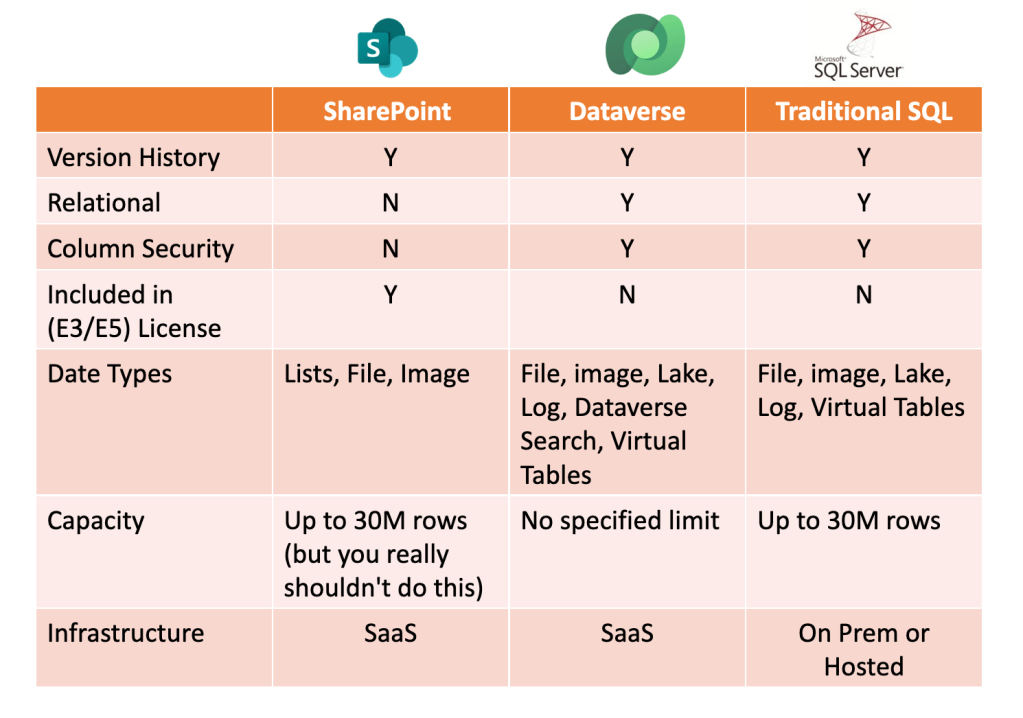
Don’t let perfection hinder progress
So by now. you may be thinking I am a shill for Microsoft trying to push you into buying more stuff. And in some way, there is a little truth there. But on the other hand, I want you/all of us to go into this huge decision with eyes wide-open, sober-minded. What is ‘the best’ may not be feasible, and based on where you are in your journey, less than perfect may be fine or at least a step in the right direction.
Allow me to level set for a minute. When developing a solution out of thin air, we would all love to start with fully fleshed requirements for an awesome app, where every stakeholder agreed on the functionality, every software architect agreed on the technical approach, there is a dedicated PM with a project charter, and the PM has assigned a roster of seasoned developers to solely work on this project.
Sadly, that is just not the world we live in, and with low-code, that can actually work to our benefit. This is because lack of a rigid structure means we can be flexible with our development, and not constrained by the tyranny of a hierarchy. All this is congruent with an Agile software development approach which just means, we can build solutions in a small low-risk iterative manner, demo it, obtain sign-off, and then move on to the next chunk, or iteration. Moreover, with low-code, most of the apps aren’t built by traditional code-first silicon valley Mark Zuckerberg Computer Science Kickboxing virgins. Those guys are busy with other things. Usually, low-code solutions are built in the spare time of an information worker that outgrew Excel, and they just want to make life easier with a process improvement. The idea of automation or an app, usually gets initiated by an individual seeing a few videos on YouTube as their inspiration so they decide to start tinkering.
Needless to say with a Power Platform Data source, if you are in the unlikely case where you know the tools, their limitations, and you have iron-clad requirements, go ahead and pick the best data source that works for you.
But if you are like most of us, you don’t fully know what these tools can do, or even have the requirements, you are probably starting out scratching your own itch with a technical solution. Go ahead and just pick SharePoint as a data source, document it’s limits, and move on with building out an awesome app. After all, version 1.0 of anything is never perfect. And usually, good-enough will suffice for a proof of concept.
Don’t be penny-wise, pound foolish. Meaning, don’t rule out Dataverse entirely simply because of the additional cost. You may not need to buy the add-on for everyone. In some situations, you can opt to buy a single Dataverse license to create a source-of-truth environment, and have other programs, like a SharePoint list piggyback off said source-of-truth. Everyone who consumes the data from the SharePoint list doesn’t need a Dataverse license. Just keep in mind, you now have another moving part to monitor, and manage (the integration between the source data and the SharePoint list). I am not making a recommendation. I don’t know your particular case. I want to stress, with M365, we have options. Based on your crew, you can play the hand that you are dealt.
Any Questions? Please post them in the comments!
If this post was helpful, please share it as a token of your appreciation to support the site and consider subscribing to be notified of new posts!

 Level Up M365