

Photo credit: Copilot
Hi y’all, welcome back. Today we’re diving into a topic that comes up often with my clients: Gantt charts in Microsoft 365. This feature has been highly sought after, and while Microsoft doesn’t give us a one-size-fits-all solution, there are several ways to achieve it depending on your needs. And while this post is a text only format, be sure to follow my podcast via the link here as I plan on doing an episode on this topic along with some banter. That being said, let’s dig in!
Table of Contents
- Summary
- Comparison Table
- Option 1: Buy It – Microsoft Project (Planner Premium)
- Option 2: Out-of-the box Legacy Method via a SharePoint List
- Option 3: Build It – Power Apps
- Closing Thoughts
- Related Posts on Project Management in M365
Summary
- SharePoint offers a Legacy Out-of-the box Gantt: Free but clunky. Not mobile-friendly and hard to embed.
- Microsoft Project: Best experience, but most expensive. Comes with polished reporting and integration.
- Power Apps: Flexible middle ground. Requires effort to build but can be tailored exactly to your needs.
Comparison Table
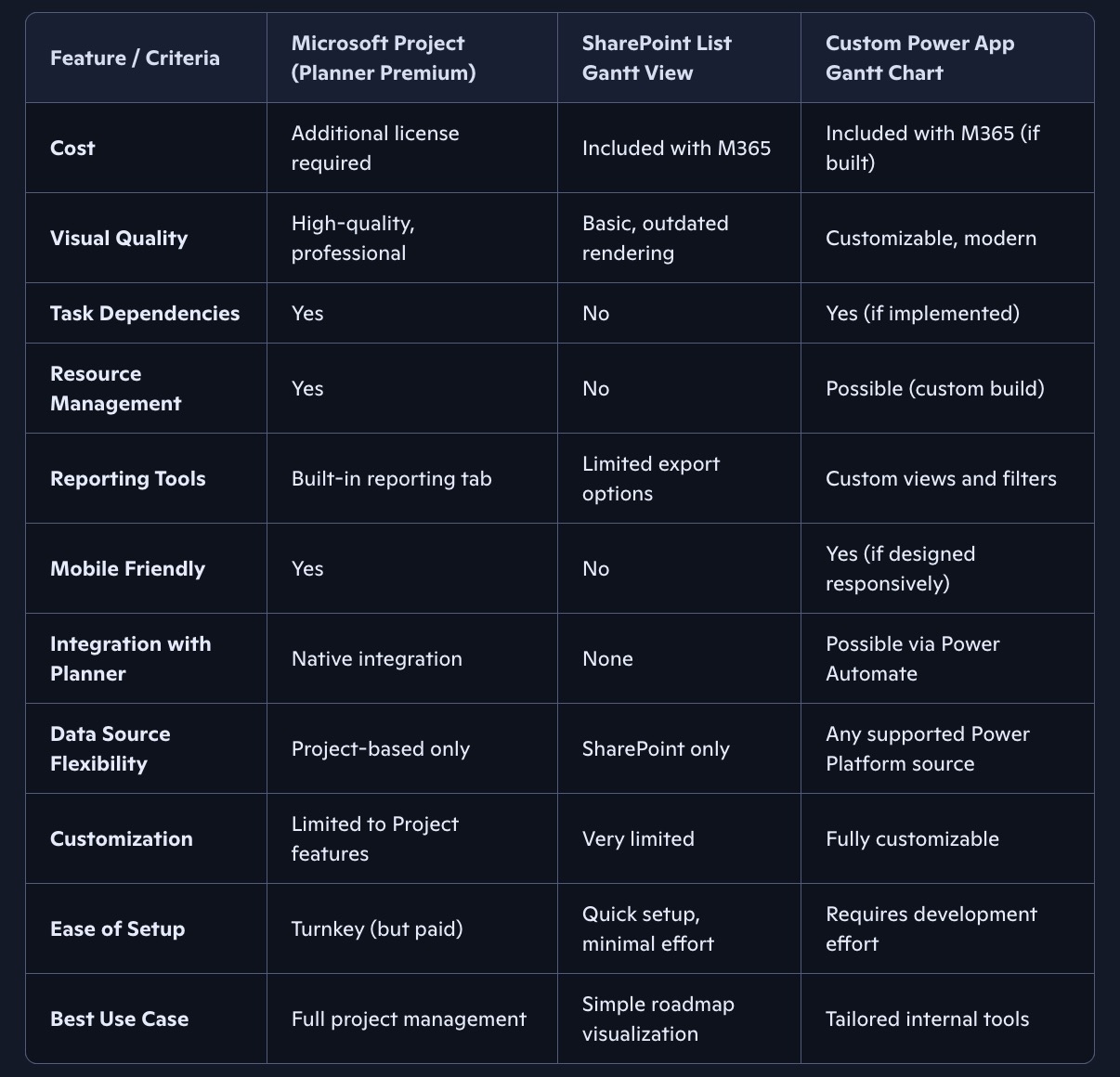
Photo credit: Copilot
Option 1: Buy It – Microsoft Project (Planner Premium)

Image source: bulb.digital
- Out-of-the-box solution: Microsoft Project is the native M365 tool for Gantt charts.
- Integration: Works well with Planner, which itself integrates nicely with Power Platform automations.
- Licensing: It’s an additional upcharge (not included in E5). However, view-only access doesn’t require a license, which is a big improvement over legacy versions.
- Platform: Web client only (SaaS solution in the browser). The thick client version of Project is a different product entirely.
- Pros: Rich reporting, dependencies, resource management, polished visuals.
- Cons: Cost. You’re paying for the premium experience, but many argue it’s worth it if only project managers need full licenses.
Footnote: I talk more about the merging of Project and Planner on Episode 5 of my Podcast here.
Option 2: Out-of-the box Legacy Method via a SharePoint List

Photo credit: https://www.youtube.com/@levelupm365
- Cost: Free, included with your M365 entitlement.
- How it works: Add due dates to tasks in a SharePoint list and generate a rudimentary Gantt chart.
- Limitations:
- No task dependencies
- No resource management
- Ugly visuals (classic rendering, not mobile-friendly)
- Limited export options
- Use case: Works if you just need a basic roadmap view without advanced project management features.
Footnote: I actually show you how to built this Gantt chart on my Youtube channel here. More content is on the way, subscribe to that channel or you will be missing out!
Option 3: Build It – Power Apps

Photo credit: My Personal Power App via https://levelupm365.com/
- Custom solution: I built a Power App that uses SharePoint as a data source to generate a visual Gantt chart.
- Flexibility:
- Not limited to SharePoint—can pull from multiple data sources (Salesforce, Service Now, Excel , etc.)
- Can embed in a webpage or run as a standalone app.
- Views are customizable (late tasks, tasks due soon, tasks assigned to you, etc.).
- Cost: No additional licensing if you’re already on E3/E5.
- Effort: Requires some investment to build, but once done, it’s highly adaptable.
- Future potential: I’ve considered selling the code outright if there’s interest. Right now, I am just eating my own brand building this out to learn.
Footnote: If you would like a quick demo on the app, I have it pasted below. Also here is the Youtube link
Closing Thoughts
Those are the main options for achieving a Gantt chart within Microsoft 365 today. Unfortunately, Planner alone doesn’t give you a Gantt chart unless you upgrade to Planner Premium (aka Project). Also, I’ve intentionally excluded Excel from this list. But in theory, that’s an option albeit a manual one. And like I always say, you can opt for a 3rd party solution. But you will get 3rd party results, lack of compliance and additional cost. If the tool is free, you are the product via privacy mining.
So I’d love to hear from you:
- What are you using to generate Gantt charts in M365?
- Have you turned to third-party tools, and if so, why?
- Would you be interested in a Power App solution like the one I’ve built?
Drop your thoughts in the comments, I’d really appreciate the feedback!
Related Posts on Project Management in M365
- Manage Tasks with ease with a KANBAN board write up here – https://levelupm365.com/2024/03/23/m365-kanban-supremacy-and-improving-communication-at-scale/
- Podcast of managing tasks with a KANBAN board – https://levelupm365.com/2024/08/26/podcast-8-kanban-board-supremacy-new-loop-and-sharepoint-esignature/
If this post was helpful support the effort by ether of the following, share, like, subscribe, leave a tip!

 Level Up M365